
gc start fails, the last line is a FATAL: marker. The line below
it is a URL that links here. Find your symptom in the lookup below, then
expand its section for the cause and resolution.
This page covers seven common
gc start failures. For installation issues
(gc not on PATH, missing prerequisites, version mismatches), see
Troubleshooting. For Dolt store
recovery, see Dolt bloat recovery.What a failed gc start looks like
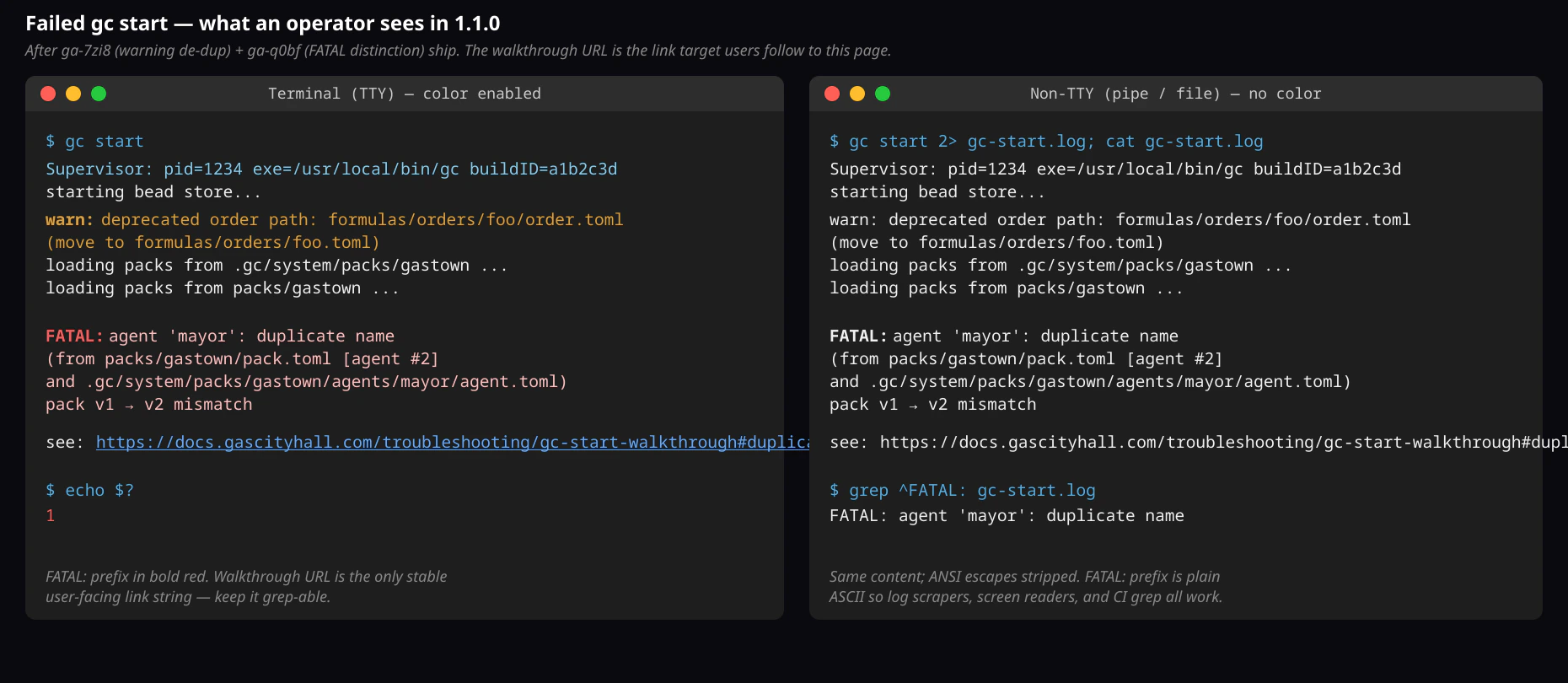
FATAL: prefix is the stable marker — bold red on a TTY, plain
gc-fatal: ASCII when piped or redirected. The same line ends with
see: <URL> pointing to the matching section below.
Quick lookup
- bd op_init timeout
Symptom
gc start hangs and the supervisor cycles through
starting_bead_store retries with no actionable error.
Cause
bd runs a config schema auto-migration on every bd config set call.
An older gc issued two bd config set invocations while initializing
the bead store, and each could outlast the 30s op_init provider timeout
and be killed, so the supervisor never reached ready state. Current gc
writes .beads/config.yaml directly instead.
Resolution
Upgrade gc and bd to the latest release. Verify:
gc start still hangs after upgrading, check that your gc binary
on disk matches the running supervisor — see
Pack schema mismatch for the drift-detection
flow.
- Pack schema mismatch
Symptom
go install ./cmd/gc while the
supervisor is still running.
Cause
The on-disk gc binary was rebuilt and now understands pack schema 2.
The running gascity-supervisor (a long-lived systemd user service)
keeps executing the previous binary’s image and the cached pack
snapshots it parsed at startup. New requests to the supervisor still
go through the old code path.
gc start detects this binary drift and restarts the supervisor.
Resolution
gc start detects the drift and restarts the supervisor. Confirm:
GC_SUPERVISOR_SYSTEMD_UNIT (see “Delegating the Supervisor Lifecycle”
in the troubleshooting guide), restart that unit instead:
systemctl restart <unit>, with --user for user-scope units. The
drift messages print the exact command for the configured unit.
Verify after restart:
buildID should match gc version.
- Duplicate agent name
Symptom
[[agent]] blocks (legacy inline layout) for an agent
name that another included pack declares in
agents/<name>/agent.toml (current directory layout). Both contribute the same
agent name; cross-pack agent name collisions are hard errors, so the
validator refuses the ambiguity.
Resolution
Choose one of the following.
- Unknown field
Symptom
unknown field <path> error during pack parse.
Cause
Your pack.toml declares a field that the current gc binary’s
schema does not recognise. The most common case is
[agent.pool], removed in favour of flat min_active_sessions and
max_active_sessions on the agent itself.
Resolution
Translate the deprecated block:
- Rig path required
Symptom
site.toml
companion file. That mechanism is gone; city.toml is now the sole
source of truth for rig locations.
Resolution
Add a path to each [[rigs]] entry in city.toml:
gc start to verify.
- Template not found
Symptom
[[named_session]] block in city.toml references an agent template
(by name) that no loaded pack provides. The most common case: the
relevant pack is missing from [city] includes.
Resolution
Add the pack to city.toml’s includes list:
- Duplicate identity
Symptom
[[named_session]] in
both city.toml and a pack’s pack.toml. Each side claims
ownership of the named-session identity; the validator refuses the
collision.
Resolution
Remove the [[named_session]] from one side. The convention is to
let the pack own the named-session identity and let city.toml
override only when necessary:
agent config rather than redeclaring the identity.
Still stuck?
- Run
gc doctor --verboseand capture its output. - Capture the failed
gc startoutput: - File an issue at
gastownhall/gascity/issues
with both attached, plus your OS / architecture and
gc version.